
Integrate unitQ with Jira to infuse AI customer insights into development workflows. Detect, prioritize, and resolve issues faster while boosting collaboration, accelerating innovation, and enhancing the customer experience—all powered by the authentic voice of your customers.
Jira and unitQ
Ditch manual, biased and late customer insights.
Pinpoint real issues and needs instantly.
The most accurate customer insights platform

Aggregate
Integrate with any channel and translate 100+ languages

Categorize
ML assigns every touchpoint to 1,000+ custom categories.

Analyze
Create custom dashboards, and ask agentQ business critical questions.
Take Action
Get alerts on trending issues, prioritize your roadmap, create tickets, and more.
Fix bugs and issues faster
Integrate unitQ with Jira to loop in the right teams and equip them with the insights they need to quickly identify, prioritize, and resolve issues.

Create Jira issues directly from unitQ
When unitQ alerts you to an issue, quickly create a Jira ticket with all the details your engineering team needs. Open unitQ, generate the issue instantly—no need to switch to Jira. unitQ automatically links the ticket to the relevant Category for seamless tracking and resolution.

Track Jira Issues from Categories in unitQ
Stay on top of each Jira issue directly in unitQ, which displays relevant Jira fields for every linked issue. Track engineering progress in real time and ensure feedback is being addressed efficiently within the relevant category.
See unitQ Categories directly in Jira
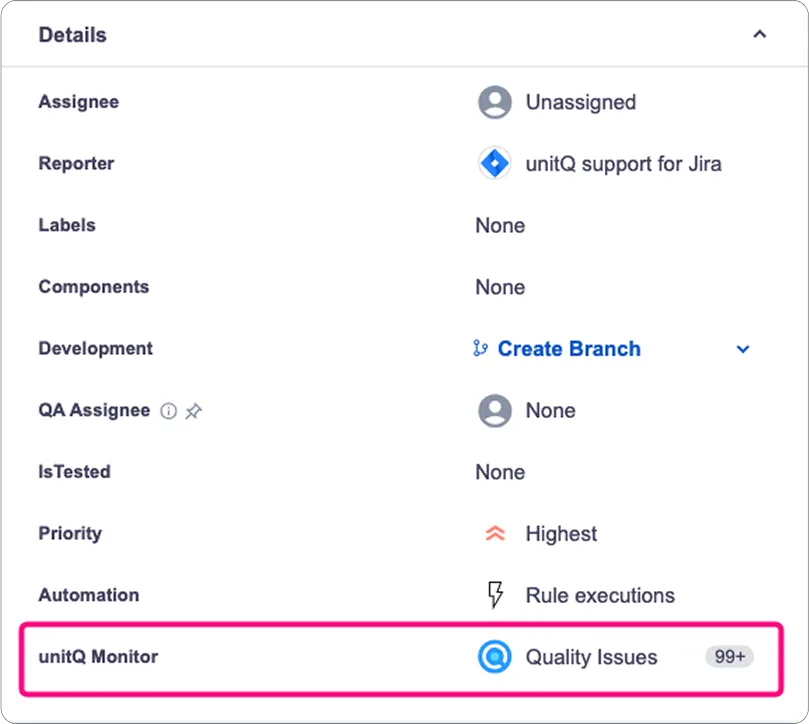
Engineering teams can seamlessly access relevant unitQ categories with real-time customer insights—right within their Jira workflow. Track feedback trends, review user-reported issues, and dive into unitQ to generate an AI root cause analysis.
Installing Jira Cloud Is Easy
To get started, install the unitQ App from the Atlassian Marketplace:
Log into Jira as an admin or privileged user.
Navigate to the Marketplace by choosing Apps > Find New Apps.
Type unitQ in the Search for Apps box and press Enter.
Click the unitQ app tile. On the next screen, click Get app to install the app.
After you install the unitQ app, copy the unitQ Jira token that appears on the installation screen and securely share it with your unitQ customer success team via Slack. The unitQ customer success team will let you know as soon as they integrate your unitQ Jira token into unitQ.








Trusted by Category Leaders








See it in action
Join category leaders and start using AI to drive growth, reduce churn, and build loyalty with unitQ.
Get a demo